

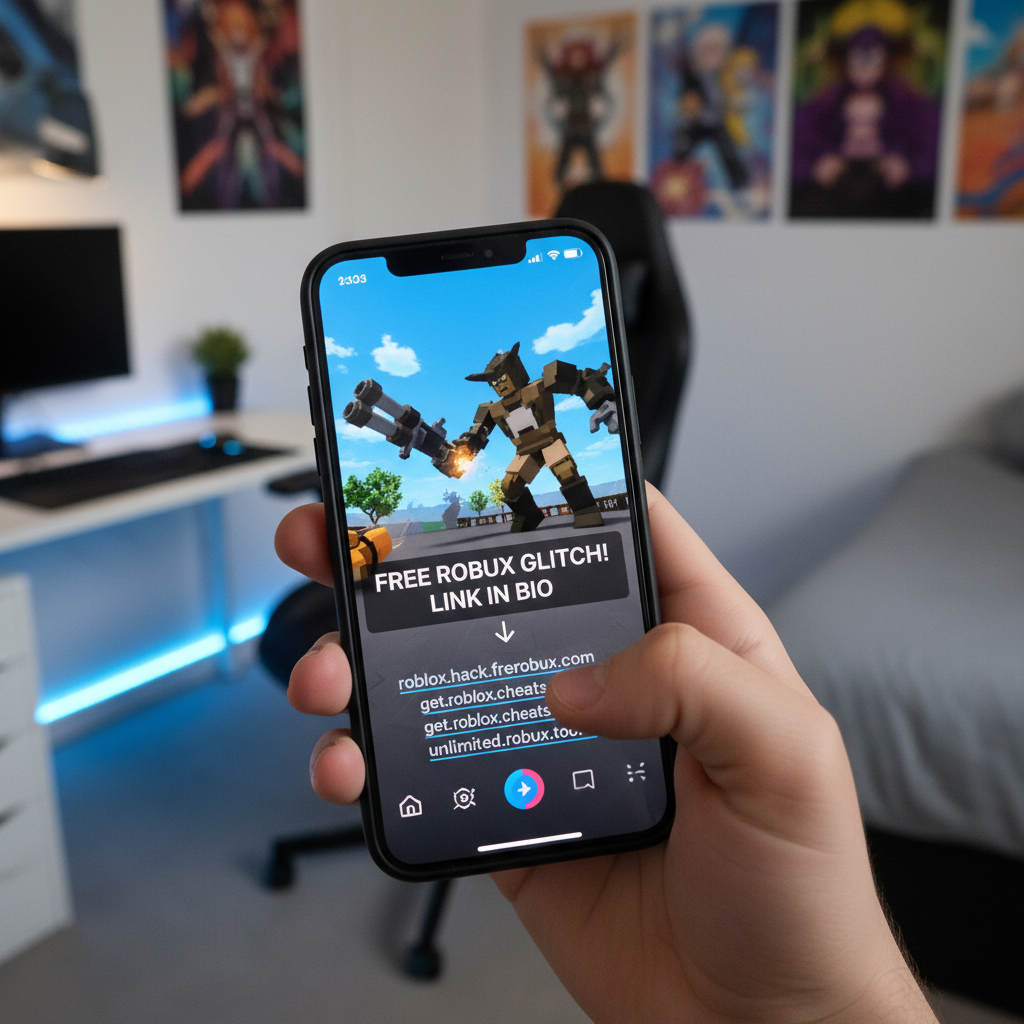
Kids want to bend the rules. On Roblox, that usually means using “script executors”—tools that let players fly, get infinite money, or walk through walls. But cybercriminals are exploiting this hunger for cheats. Security researchers recently uncovered a sophisticated malware campaign spreading rapidly on TikTok. It targets young, unsuspecting Roblox players with promises of free, premium exploit tools, but delivers a nasty credential-stealing payload instead.
The trap starts with short, flashy TikTok videos. These clips show gameplay of popular Roblox titles like Blox Fruits or BedWars with unbelievable hacks enabled. The creators claim viewers can get these powers for free. All they have to do is click the link in the TikToker’s bio.
The Anatomy of a Gaming Scam
“It is a highly effective social engineering trick,” says Marcus Thorne, a senior threat analyst at Seker Security, the cyber firm that first flagged the campaign. “Kids are naturally trusting. They do not think twice about downloading a file if it means they can show off to their friends online.”
Once a user clicks the link, they are usually redirected to a landing page on Linktree or invited to a dedicated Discord server. From there, they are prompted to download a ZIP archive hosted on public file-sharing sites like MediaFire or GitHub. The file is typically named something like Roblox_Executor_Free_2024.zip or Arceus_X_Beta.exe.
To get the software to run, the instructions tell the victim to disable their antivirus software. The scammers claim this is a “false positive” common with game cheats. It is a classic deception tactic, but to a pre-teen, it sounds perfectly plausible. They want the cheat, so they click ‘allow.’
Inside the Payload: Luna Grabber
Once the victim turns off their defenses and runs the executable, no cheat tool appears. Instead, the program silently deploys a customized variant of an information stealer known as “Luna Grabber.” This malware is designed to operate quietly in the background without raising suspicion.
The malware quickly harvests sensitive data stored on the infected machine, including:
- Saved browser passwords and autocomplete data
- Session cookies to bypass multi-factor authentication
- Credit card details stored in browser autofill
- Cryptocurrency wallet information
The hackers also have another specific target in mind: Discord accounts. Many young gamers use Discord to coordinate play sessions. By stealing Discord session tokens, the attackers can hijack these accounts instantly without needing the victim’s password. They then use the stolen accounts to message the victim’s friends, sending them the same malicious link. This creates a self-replicating viral loop.
A Risk to the Whole Household
The danger extends far beyond a lost Roblox account or a stolen gaming profile. Many children play games on shared family computers. If a child downloads this malware on a parent’s PC, the consequences scale up dramatically.
“Many of these kids share family computers,” Thorne warns. “If a child disables the antivirus on a machine their parents use for banking or remote work, the attackers suddenly have access to corporate logins, tax documents, and personal financial accounts. The collateral damage can be devastating.”
The stolen data is bundled and sent back to the scammers using Discord webhooks, a built-in feature that hackers have weaponized to exfiltrate data easily. Once the data is gone, the damage is done.
How to Protect Young Gamers
TikTok has begun removing some of the flagged accounts and videos, but new ones pop up daily. The scammers use automated bots to boost their videos with fake views, likes, and comments, making the videos look legitimate to casual scrollers. This means relying on platform moderation is not enough.
Education is the best line of defense. Parents should talk to their children about the dangers of downloading third-party software, especially programs that demand antivirus tools be disabled. Legitimate software will never ask you to turn off your security system.
Setting up dedicated, non-administrator accounts for children on shared family PCs can also limit the damage. If a child cannot authorize administrative changes, they cannot disable the antivirus or install deep-system executables. Keeping your operating system and security software fully updated is also vital to catching these threats before they run.